The Gota app
The coffee app that brews with you
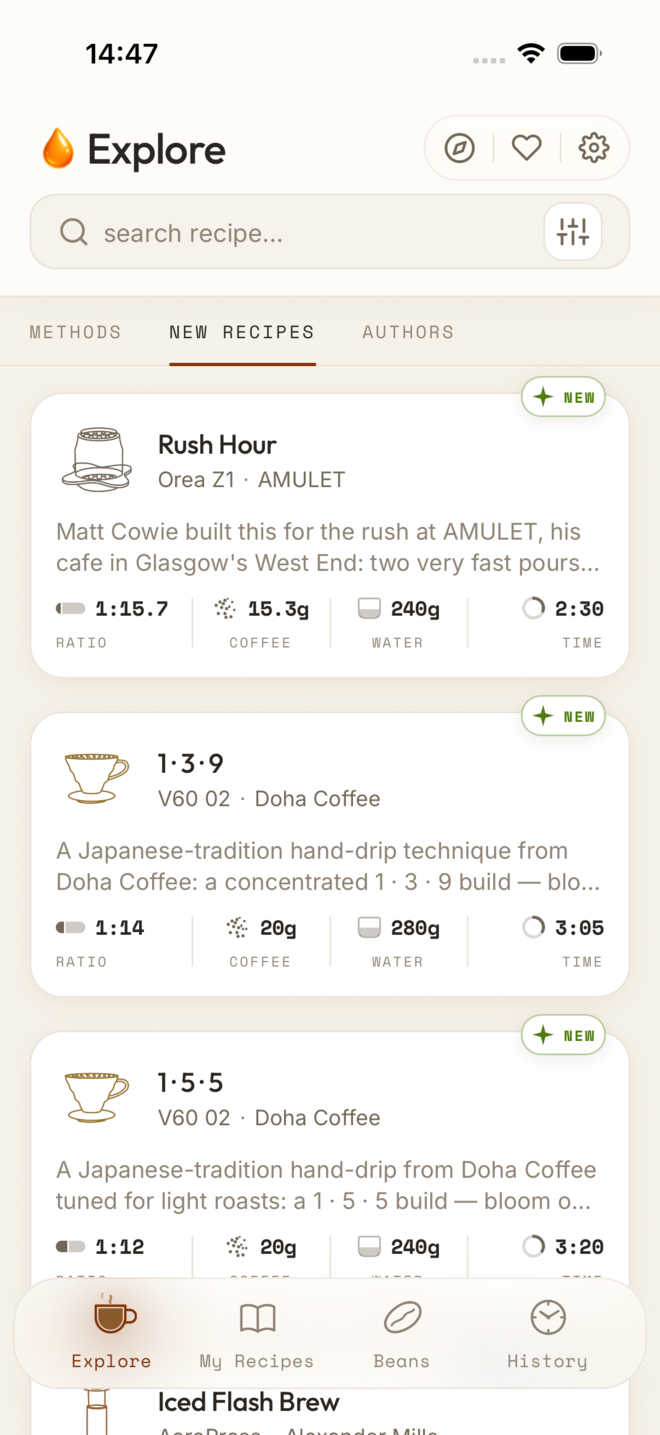
Gota is an iPhone app for brewing filter coffee, AeroPress, moka and cold brew at home. It walks you through more than a thousand recipes from named baristas, step by step, and fits each one to your gear: your grinder's own setting, your Bluetooth scale, the beans on your shelf.
- 1059
- recipes
- 100
- methods
- 50
- grinders
- 6
- languages
In depth
- Voice guidance and voice control Free Gota reads every step aloud and moves on when you say “Done” — in English, Spanish, Japanese, Portuguese, Korean and German.
- Live Brew Free Film your brew and Gota cuts the video: each step's target weight, time and temperature over your own footage, and your rating at the end.
- AI barista Gota Pro Reads the recipe, the coffee, its freshness, your grinder and your past cups, and suggests the one change worth making — before and after you brew.
- Bag scanning and your shelf Free + Pro Photograph a bag and Gota reads the label: roaster, origin, variety, process, roast date and notes. Then it tracks freshness and the grams left.
- Recipe import Gota Pro Photograph a recipe — a card, a screenshot, a page — or paste its text, and Gota turns it into a recipe with timed steps, ready to brew.
- Cold brew Free + Pro Say how much, how you'll drink it and the style you like; Gota works out dose, ratio, grind, temperature and time, then counts down the steep.
- Your grinder's settings Free Every recipe's grind as clicks, numbers or rotations on your own grinder, for 50 models.
- Bluetooth scales Free Your pour rate live, a cue at each target weight and pours that end by weight.
- Comparison Gota next to Filtru, Timer.Coffee, Beanconqueror, Aeromatic, Brew Timer and Pour-Over Coffee Recipes Timer, feature by feature, with sources.
Recipes from named baristas
More than a thousand recipes across about a hundred brewers and methods: Hario V60 and Switch, AeroPress, Chemex, Kalita Wave, Origami, Orea, April, the NextLevel Pulsar, Clever, French press, moka pot, siphon and cold brew. Each one carries its dose, water, ratio, grind, temperature and timed steps, and the name of the barista or brand behind it, with a link to the source. That includes winning recipes from the World Brewers Cup, the World AeroPress Championship and national championships.
The whole library is also on this site, one page per recipe, in six languages: browse the recipes.
A guided timer that keeps your eyes on the kettle
Start a recipe and Gota runs it with you: bloom, each pour, the waits and the swirls. Every step shows how much water to reach and by when, with a 3-2-1 count before it starts and a sound and a haptic tap at each pour, so you can watch the coffee instead of the clock.
Hands-free: voice guidance and voice control
Turn it on and Gota reads each step aloud — the water to reach, the pace, the technique, the temperature — and listens for a short answer: “Done”, “Start pour”, “Resume”, “Finish”. It works in the six languages the app speaks. How voice works.
Bluetooth scales
Connect an Acaia scale and Gota follows the pour: the grams left, your pour rate in grams per second against the band the recipe wants, a cue just before each target and pours that close on their own when the weight settles. The weights and the curve of each pour stay in your brew history. Compatible scales.
Your grinder's settings
Recipes write their grind on Gota's scale from 1, very fine, to 10, very coarse. Add your grinders and every recipe shows that grind as the setting on yours — 20 to 26 clicks on a Comandante C40 for a V60, for instance — and Gota remembers where you left the dial with each coffee. Settings for 50 grinders.
Your beans, and how fresh they are
Keep a shelf of the coffees you buy: roaster, origin, variety, process, roast level and roast date. Gota tracks how fresh each bag is — resting, ready, at its best, fading — counts the grams left and tells you when a bag is about to run out. With Gota Pro, photograph the bag and it fills everything in. Bag scanning.
The AI barista
Before you brew, the barista reads the recipe, the coffee, how fresh it is, your grinder and your past cups with it, and suggests one change worth making. After the cup, tell it how it tasted and it suggests the next one. One change at a time, with the reason behind it. How the barista works.
Import a recipe
Found a recipe on a card, in a book or in a screenshot? Photograph it, or paste its text, and Gota turns it into a recipe you can brew, timed steps included, ready to review before you save it. Recipe import.
Live Brew: a video of your brew, edited for you
Film your brew with the camera and Gota cuts the video for you: a cover with the recipe, a card for each step with its target weight, time and temperature, the clock running and your rating at the end. A vertical video, ready to share. Live Brew.
A brew journal that learns your taste
Rate every cup, tag its flavours and add tasting notes. Your history shows what you brewed, with which beans, grinder setting and scale readings, and Insights shows your current coffee, a suggested next brew and where your taste is drifting.
Your own recipes
Build a recipe from scratch or adapt one from the library: steps, water targets, pour rates and timing. Share it as an image card. Two recipes of your own are free; Gota Pro makes them unlimited.
Cold brew, planned and timed
Tell the cold brew assistant how much you want, how you'll drink it and the style you like, and it works out the dose, ratio, grind, temperature and steeping time. The steep runs on your Lock Screen and in the Dynamic Island until it is ready. Cold brew.
Learn
Forty lessons in five chapters — the bean, foundations, methods, techniques and cupping — with interactive demos, and a glossary of 51 terms for when a word gets in the way. Read them on the web.
And the rest
Widgets for the Home and Lock Screens (the next cup, your current coffee, cups waiting for a rating), an extraction calculator with the SCA brewing control chart, the filters that fit each brewer, grams or ounces, Celsius or Fahrenheit, and dark mode. The library is on your phone, so it works offline.
Free, and Gota Pro
The app is free to download and free to keep: a core library of recipes, the guided timer, voice, Live Brew, the journal and two recipes of your own. Gota Pro adds every recipe in the library, unlimited recipes of your own and the AI features — import, bag scanning, the barista and the cold brew assistant — as a monthly or yearly subscription.
No account, and your coffee stays on your phone
Gota doesn't ask for an email or an account. Your brews, recipes and history live on your device; the app goes online only for the AI features, purchases and the reports you choose to send.
Who makes Gota
Gota is made by Utropia, a small independent studio in Spain. Write to us at hello@utropia.es — we read everything. About Gota.
Gota and other coffee apps
How Gota compares with Filtru, Timer.Coffee, Beanconqueror, Aeromatic and other brewing apps, feature by feature and with sources: Coffee brewing apps compared.
Questions
- Is Gota free?
- Yes. The app is free to download, with a core library of recipes, the guided timer, voice guidance and control, Live Brew videos, the brew journal and two recipes of your own. Gota Pro unlocks the full library, unlimited recipes of your own and the AI features: recipe import, bag scanning, the barista and the cold brew assistant. Pro is a monthly or yearly subscription; the App Store shows the price for your country.
- Does voice control work in my language?
- Gota reads the steps aloud and listens for its commands in all six languages the app speaks: English, Spanish, Japanese, Portuguese, Korean and German. In English the commands are “Done”, “Start pour”, “Resume” and “Finish”; in Spanish, “Hecho”, “Empezar vertido”, “Reanudar” and “Terminar”. You pause with the button, not by voice.
- Which coffee scales work with Gota?
- Acaia scales over Bluetooth: Pearl, Pearl S, Lunar, Pyxis, Cinco and Umbra. Timemore, BOOKOO, DiFluid, Felicita and Decent are in beta. A scale is optional: every recipe also runs on the timer alone.
- Which grinders does Gota know?
- Fifty models from 17 brands, including Comandante, 1Zpresso, Timemore, Baratza, Fellow, Niche, DF64, Kingrinder and Wilfa. Gota shows each recipe's grind as the setting on your own grinder: clicks, numbers or rotations. You can add any other grinder yourself.
- Can Gota import a recipe from a YouTube or Instagram video?
- Not from a link. Gota Pro imports a recipe from up to three photos (a card, a screenshot, a page of a book) or from text you paste, so for a video you paste its description or the recipe written under it.
- Do I need an account?
- No. Gota never asks for an email or a sign-up. Your brews, recipes and history stay on your iPhone.
- Does it work offline?
- Yes. The recipe library, the timer, voice guidance and your journal all work without a connection. Only the AI features and purchases need the internet.
- Is there an Android or Apple Watch version?
- Not yet. Gota runs on iPhone with iOS 16.4 or later.
- Where do the recipes come from?
- From the baristas, roasters and brands who published them: world champions such as Tetsu Kasuya and Matt Winton, James Hoffmann, Scott Rao, April, Hario, Orea and many more. Every recipe names its author and links to the original source when there is one.
- Does Gota do espresso?
- No. Gota is made for filter coffee and its neighbours: pour-over, immersion and hybrid drippers, AeroPress, French press, moka pot, siphon, Turkish coffee and cold brew.
Next step
Let Gota run the timer.
This exact recipe, step by step on your iPhone — haptics at every pour, live water targets, and a brew log that remembers how the cup turned out.
- Audio and haptic cues per step
- Scale the dose — ratios follow
- Save it and log your brew
Free iOS No signup 1059 recipes by 146 baristas